> ## Documentation Index
> Fetch the complete documentation index at: https://docs.maildiver.com/docs/llms.txt
> Use this file to discover all available pages before exploring further.
# How to Add DNS Records
> Learn how to set up DNS records for MailDiver
Before sending emails with MailDiver, you need to create a domain and add the DNS records to your registrar. This ensures good deliverability and authentication.
This is what it looks like when you create a domain:
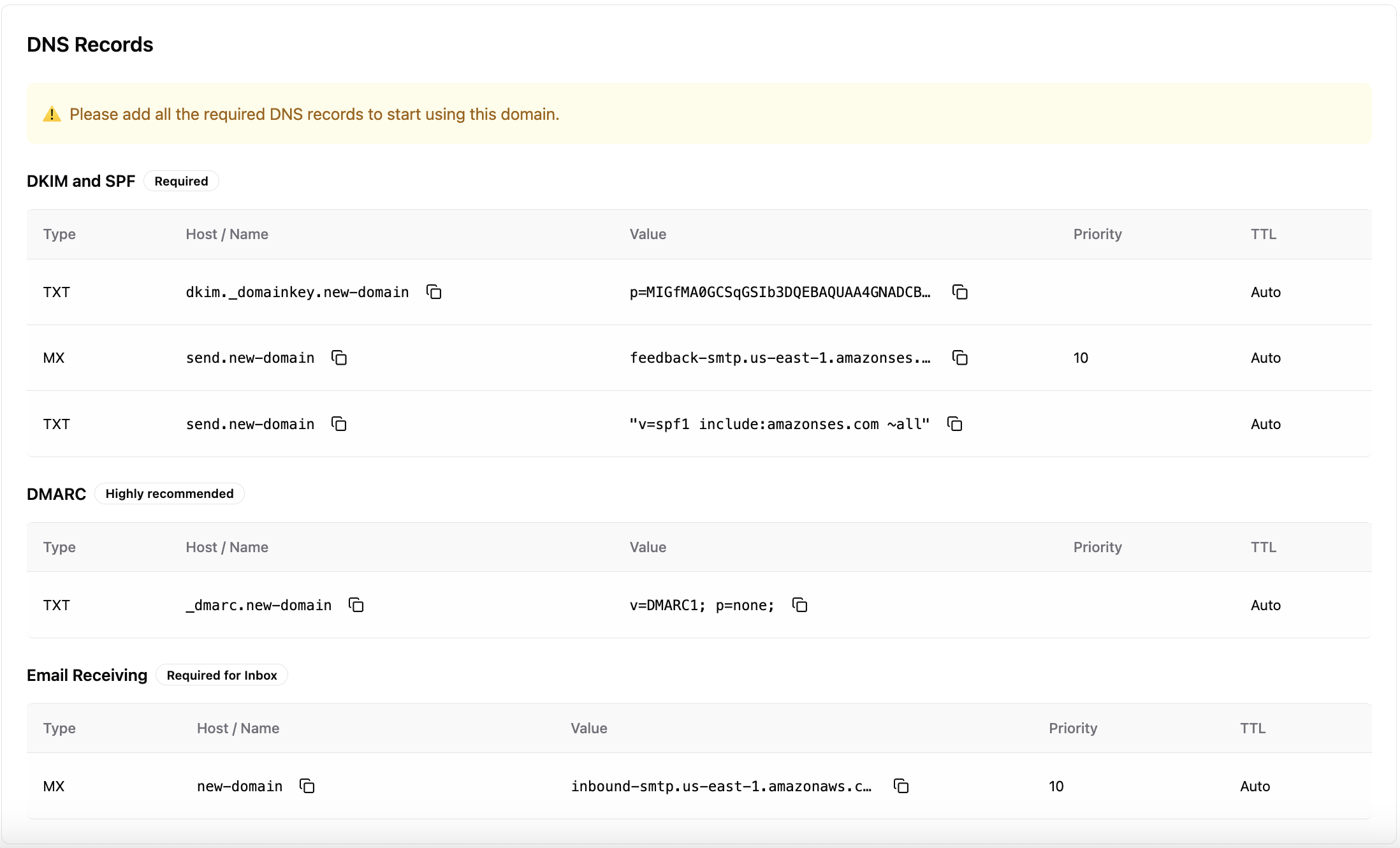 Let's break down the records and learn how to add them to your registrar.
## DKIM and SPF Records
These records are required for email authentication and deliverability.
## DMARC Record
Highly recommended for enhanced security and deliverability monitoring.
## Email Receiving
Required if you want to receive emails in the native built-in MailDiver Inbox. If you don't need to receive emails, you can skip this record.
| Type | Host / Name | Value | Priority | TTL |
| ---- | --------------- | ------------------------------------- | -------- | ---- |
| MX | your-domain.com | inbound-smtp.ses-region.amazonaws.com | 10 | Auto |
After adding these records, you need to wait for DNS propagation. Generally,
it takes a few minutes, but sometimes it can take up to 48 hours. Click the
`Check Verification` button in the MailDiver dashboard to see the status.
## Common Issues and Solutions
### If records aren't verifying:
1. Check for typos in the Host/Name fields
2. Ensure you've replaced {domain} with your actual domain
3. Verify the record types (TXT vs MX)
4. Wait for DNS propagation (up to 48 hours)
5. Use DNS lookup tools to verify record publication
### If you need help:
* Use the dashboard's copy buttons to avoid typos
* [Contact support](https://maildiver.com/support/) if records aren't verified after 48 hours or you need help with anything else
* Check your DNS provider's specific documentation for custom requirements
Let's break down the records and learn how to add them to your registrar.
## DKIM and SPF Records
These records are required for email authentication and deliverability.
## DMARC Record
Highly recommended for enhanced security and deliverability monitoring.
## Email Receiving
Required if you want to receive emails in the native built-in MailDiver Inbox. If you don't need to receive emails, you can skip this record.
| Type | Host / Name | Value | Priority | TTL |
| ---- | --------------- | ------------------------------------- | -------- | ---- |
| MX | your-domain.com | inbound-smtp.ses-region.amazonaws.com | 10 | Auto |
After adding these records, you need to wait for DNS propagation. Generally,
it takes a few minutes, but sometimes it can take up to 48 hours. Click the
`Check Verification` button in the MailDiver dashboard to see the status.
## Common Issues and Solutions
### If records aren't verifying:
1. Check for typos in the Host/Name fields
2. Ensure you've replaced {domain} with your actual domain
3. Verify the record types (TXT vs MX)
4. Wait for DNS propagation (up to 48 hours)
5. Use DNS lookup tools to verify record publication
### If you need help:
* Use the dashboard's copy buttons to avoid typos
* [Contact support](https://maildiver.com/support/) if records aren't verified after 48 hours or you need help with anything else
* Check your DNS provider's specific documentation for custom requirements